This week, we are introducing Python programming and summary statistics, two key components of data science. In this notebook, you will practice print() statements, common arithmetic operations, built-in functions, & lists in Python while following along with the lecture!
print() Statements
The print() function in Python is useful for displaying values. It is a versatile function that can take different types of arguments and multiple arguments at once. This function does not produce cell output (which is the result of running any code cell), but just displays arguments of the function.
Printing Numbers
To display a number, just pass it in as an argument into the print() function. An argument is the value a function uses, and in Python, you pass in arguments by putting them inside of the () of a function.
# Run this cell to print the number 6

print(6)
# Now, choose any number you want & print it!
print(...)Printing Strings
In Python, sequences of letters, words, and characters are stored as strings. Strings must be enclosed in single (’ ') or double (" ") quoatations. However, when you print a string, the display will not show the quotation marks.
# Run this cell to see the display

print("Hello World!")
# Now, try displaying the following string
# Why is it erroring? Find & fix the error
print(Data Science)# Display a string of your choice (word, phrase, sentence, etc.)!
print(...)Printing Expressions
When you pass in expressions into a print() function, such as the addition or subtraction of two numbers, the expression is first evaluated before the print() function. Therefore, the print() function displays the result of the expression instead of the expression itself.
# Run this cell to see the result of printing 5 + 10

print(5 + 10)
# Pass in an expression into the print() function that will display the number 5
print(...)Printing Multiple Arguments
The print() function can take in multiple arguments (of different types too) and print them out. Each argument needs to be separated with a comma, and the print() function automatically adds a space between each argument while displaying.
# This function takes in four arguments, two numbers and two strings
# Notice how there is a comma between each of the argument

print(6, "*", 2, "is equal to", 12)
# Use 3 arguments & the print() function to display
# the following phrase: Data 6 is fun!
print(...)Stacking print() Statements
print() statements do not need to be the last line of code in a cell to display arguments! You can place them anywhere in your code & even use multiple print() statements, and each one will display its input on a new line.
# Run the cell to see how multiple print() statements are executed

print("Ready,")
print("Set,")
print("Go!")
# Your turn! Pass in anything you want into the two print() statements
# and run the cell
print(...)
print(...)Syntax Errors
It is important to make sure you call print() statements correctly in order for them to work. This includes:
Making sure you include () and spell
printin lowercase without any spacesInclude commas between arguments
Use quotations around strings
Fix the following print statements in the next few cells to make sure they display the results without any errors.
Print("Good Morning!")print(100print (5-3)print(7 "is an odd number")Using Common Operators
Python uses a lot of the same operators as a calculator to perform operations on numbers. There are some new operators that are also useful. Here is a table for your reference:
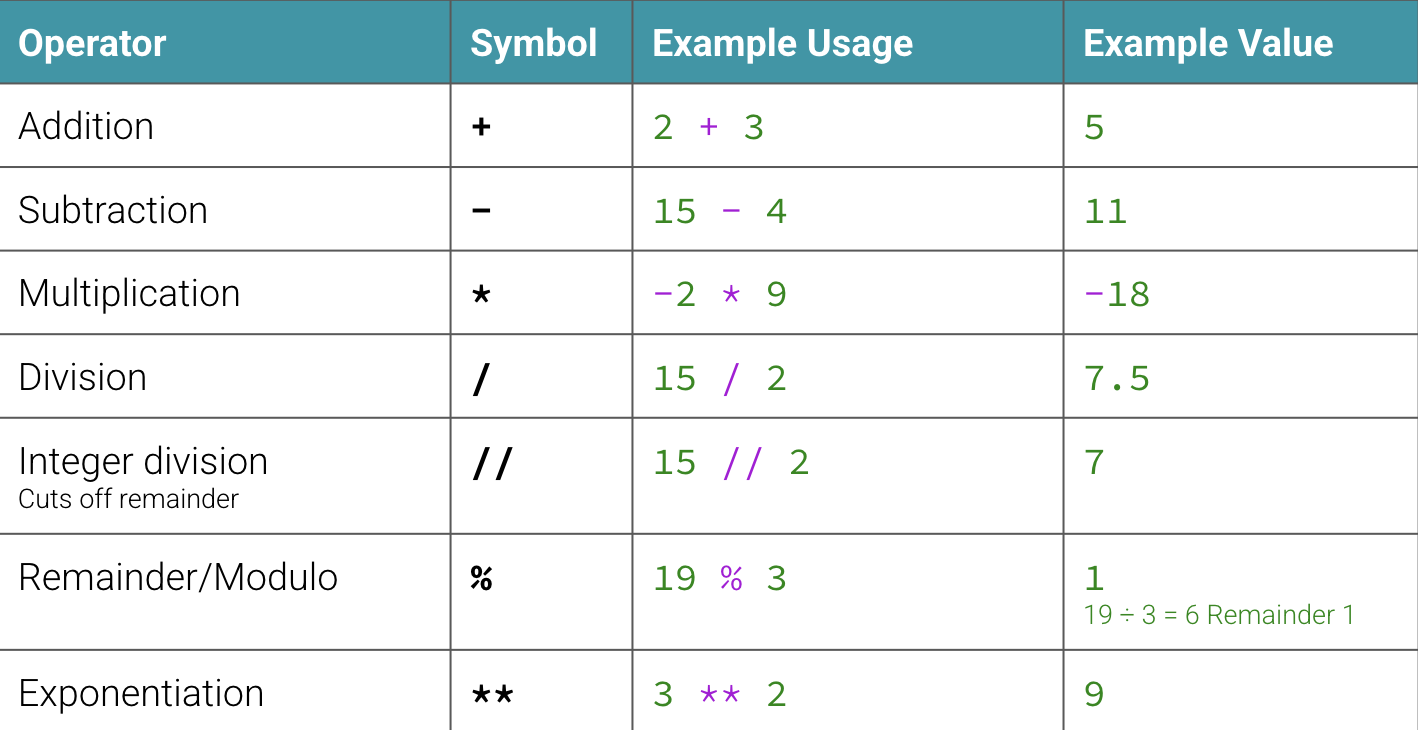
In the following code cells, write Pythone expressions using operators from above to answer each question.
(a) What is the result of adding 3 and -5?
# Write your expression for (a) here(b) What is the result of multiplying 10 and 4?
# Write your expression for (b) here
...
(c) Divide 16 by 5, then do integer division on the same two numbers and compare the answers.
# Write your division expression for (c) here
...
# Write your integer division expression for (c) here
...(d) What is the remainder of dividing 8 by 3?
# Write your expression for (d) here
...
(e) How would you write 43 as a Python expression?
# Write your expression for (e) here
...
Assignments & Variables
We can store data values in Python through the use of variables. A variable is a named container for a particular set of bits or type of data (like integer, float, string, etc...). Variables can hold / represent primitive data types or objects. Each variable in Python has a type of either primitive or non-primitive. Primitive data types can either be numerical or non-numerical. Let’s look at how we would assign primitive data types to variables.
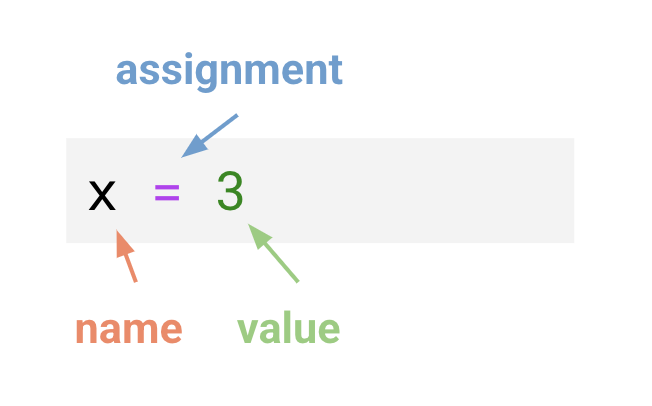
Four Primitive Data Types
Integer (int): Represents whole numbers. Examples: x = 10, y = 5.
Float (float): Represents floating-point numbers, also known as decimal values. Examples: x = 1.5, y = 3.14.
Boolean (bool): Represents True or False values. Examples: is_real = True, is_false = False.
String (str): Represents a sequence of characters. Examples: greeting = “Hello!”
You can check the type of a variable or value using the type() function.
Note: we have to print out x here to see its value because assigning variables does not automatically return anything when we run our code
# Check the type of the variable 'x'

x = 23
print(x)
type(...)
# Check the type of the variable 'y'
y = 4.02
print(y)
type(...)# Check the type of the variable 'is_correct'
is_correct = True
print(is_correct)
type(...)# Check the type of the variable 'sentence'
sentence = "Data 6 is fun"
print(sentence)
type(...)Type Errors
When you try to combine different types of values (usually a non-number & a number type), it can cause errors. Some methods of combining are adding, subtracting, & other mathematical operations.
# Try running this cell, & check whether it errors or not
"6" + 4
# Now, turn the 4 into a string (using quotations), & perform the same addition
# What does the result look like?
...In the cell above, adding two strings, concatenates them. This basically means that the smaller strings are combined into one larger string.
# Now, turn the 6 into an integer & perform the same addition
# What does the result look like?
...
In the cell above, since both the values were integers, the addition resulted in mathematical addition like a calculator.
Using Variables in Calculations
Once you store integers or floats in variables, you can use the variables in place of the numbers in mathematical expressions and equations.
# Here is an example
x = 3
y = 4.5
x + y
# Now, your turn!
# Choose two numbers
a = ...
b = ...
# Add, subtract, multiply, divide them
...Common Mistakes in Assigning Variables
It is important to follow proper notation when naming and assigning variables to make sure that Python recognizes the variable correctly. Variables are allowed to use numbers, letters, & underscores. Here are some common mistakes to avoid:
Starting your variable names with numbers. For instance,
3_grade = 10is not allowed, but you can include numbers in the name otherwise:grade_3 = 10is valid.Assigning variables to values instead of values to variables.
3 = xis incorrect, it should always bex = 3.Variables are case sensitive. If you have a variable named
cat, you cannot use it asCat,cAt,CAT, etc.Variables cannot include special characters such as &, !, #, etc.
Fix the errors in the following variable assignments. When you run the cell, there should not be any error messages.
"Andrew" = name
name
2024_revenue = 20000
2024_revenuecomplete = False
CompleteBuilt-In Data Structures & Functions
Python has various built-in data structures and functions that make it easier to perform various operations.
list[] is a built-in data structure that allows multiple items to be stored within the same variable.
(a) Make a list with the following elements: ‘Billy’ (string), 35, 42.1, True
# Write your code for (a) herel1 = [2, 7, 10, 1, 300, 30, 73](b) How can we get the sum of all of the elements in l1?
# Write your code for (b) here(c) How can we sort all of the elements in l1 from least to greatest?
# Write your code for (c) here